
3 Factors Impacting Your Wi-Fi Score
The Gist
- Internet and Wi-Fi are not the same thing. We’re breaking down what actually affects Wi-Fi performance in and around your home.
- Get a sneak peek at the ultimate outage-killer. Meet the latest armour to keep your internet always-on for those important work meetings.
A lot of people think their internet speed and their Wi-Fi score are the exact same thing. But in reality, your internet speed is what we deliver to your home, while your Wi-Fi score is how well that connection is actually performing on your devices.
If your connection has been feeling a little sluggish, your Wi-Fi score might be taking a hit.
Here are the 3 main factors affecting it, and a sneak peek at a game-changing feature we have in the works:
1. Physical Interference and Home Construction
Your router acts like a sprinkler system for your internet. Because Wi-Fi signals are radio waves, they absolutely hate physical obstacles. While things like a giant fish tank, mirrors, or large metal appliances can bounce a signal, the biggest culprit is often the materials used in your home.
Here in Southern Colorado, we have beautiful, unique architecture. But if you live in an adobe home, or a house built with thick concrete, steel framing, or dense stucco, those materials act like a fortress against your signal. Adobe, in particular, is incredibly dense and absorbs radio waves almost immediately.
We often hear from customers in adobe homes who don’t understand why their brand-new router can’t reach the next room. This is exactly why a single router usually isn’t enough for these types of builds, and why extended Wi-Fi is an absolute necessity to get a strong signal from the living room to the bedroom.
That’s exactly why our expert team of installers provides a true white-glove service from day one. Our technicians take the time to understand your specific layout and figure out the absolute best placement for your routers, both inside and outside your home, to ensure property-wide coverage and a consistently high Wi-Fi performance.
2. The Hidden Reality of Your Connected Home
When we ask people how many devices are connected to their Wi-Fi, the guess is usually around five or six. Most of us immediately think of our phones, laptops, and TVs.
But today’s homes are incredibly connected, and the reality is usually a much higher number.
Think about it: what about your smart garage door opener, your smart locks, the video doorbell, your smart thermostat, or even the Wi-Fi-enabled Traeger grill out on the back patio?
The good news? Your Jade equipment is an absolute powerhouse designed to handle up to 250 connected devices at once. So your network isn’t going to crash from having too many things hooked up. However, every single one of those connected devices is constantly (and quietly) communicating with the router in the background. Even when you aren’t actively using them, they are pulling data and taking up a slice of the pie, which ultimately plays a big role in your overall Wi-Fi score.
Want to see how many devices are connected in YOUR home?
Download the Jade Wi-Fi app!


It acts as your personal command center, giving you ultimate control over your home network:
- Content Control: Set healthy digital boundaries, filter out inappropriate websites, and easily manage what your kids have access to online.
- Device Prioritization: Working from home and need flawless video for a big meeting? Use work mode in the app to prioritize your laptop’s bandwidth
- Pause Devices: Want some uninterrupted family time? You can easily pause the Wi-Fi connection to the kids’ devices right when dinner is ready.
3. The Unexpected (And Our Upcoming Solution!)
Let’s face it….life happens. Whether it’s caused by severe Colorado weather, a construction crew accidentally cutting a line down the street, or a sudden power disruption, losing your connection is incredibly frustrating. It’s the ultimate buzzkill.
But what if an outage didn’t actually mean you went offline?
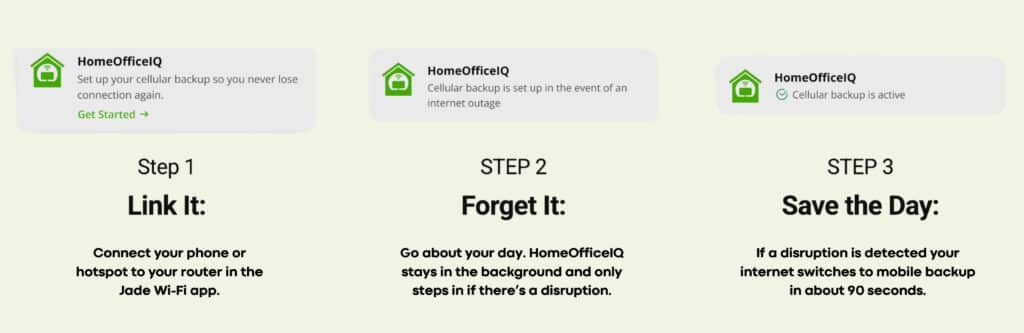
Meet HomeOfficeIQ, an invisible safety net when the internet blinks – coming exclusively to our Work from Home Warrior plan this Fall.
HomeOfficeIQ is a built-in failover feature which acts as an invisible safety net for your internet. If your primary connection ever experiences a network interruption, your router will automatically and seamlessly switch over to a backup connection within 90 seconds.
So, how does it work?
HomeOfficeIQ officially releases this Fall.